AceProject8
Publisher Description
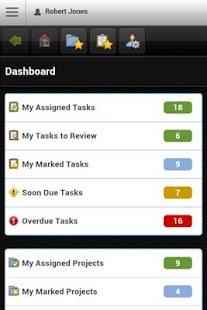
Unleash the project manager in you with AceProject! Keep track of projects, tasks, documents, expenses, timesheets and users.
AceProject Mobile enables anyone to manage projects, without any profesionnal project management knowledge required. This project collaboration software offers tons of features, including:
-> Project Management: Project tracking, project portfolio management, task management (to-do, task manager), task dependencies.
-> Document Management: Document sharing, versioning, file locking, document tracking.
-> Timesheet Management: Time tracking, time clock (punch clock).
-> Collaboration: Email notifications, international characters (multi-language collaboration), task reminder.
The free Hosted Basic package lets you create unlimited users, 1 project, 50 tasks and provides 250 MB of storage space. All features are enabled. Paid packages are available for those who need more privileges. An Intranet Package is available for those who wish to install AceProject on their own server. Most of our customers prefer our Hosted packages (SaaS-based), but some prefer having full control over the backend and manage everything themselves.
This project management system is also suitable for bug & issue tracking, project cost management, team communication, to do list manager and task collaboration solution.
AceProject helps organizations of all sizes in 80+ countries.
About AceProject
The company that develops AceProject is Websystems Inc.. The latest version released by its developer is 8. This app was rated by 1 users of our site and has an average rating of 3.0.
To install AceProject on your Android device, just click the green Continue To App button above to start the installation process. The app is listed on our website since 2013-03-26 and was downloaded 58 times. We have already checked if the download link is safe, however for your own protection we recommend that you scan the downloaded app with your antivirus. Your antivirus may detect the AceProject as malware as malware if the download link to appinventor.ai_aceprojectsoftware.AceProject is broken.
How to install AceProject on your Android device:
- Click on the Continue To App button on our website. This will redirect you to Google Play.
- Once the AceProject is shown in the Google Play listing of your Android device, you can start its download and installation. Tap on the Install button located below the search bar and to the right of the app icon.
- A pop-up window with the permissions required by AceProject will be shown. Click on Accept to continue the process.
- AceProject will be downloaded onto your device, displaying a progress. Once the download completes, the installation will start and you'll get a notification after the installation is finished.
Program Details
System requirements
Download information
Pricing
Version History
version 8
posted on 2013-03-26
Several fixes and updates
